Build an Attractive Website Using HTML 5, CSS and JQuery.

Hi reader,how are you? I hope you are well. Today I will talk with you about HTML 5. As you may know, you can build beautiful websites using HTML 5, CSS 3 and JQuery. Flash is quite helpful and I think in near future everyone use JQuery instead flash. Here I will try to help you to learn the basic of HTML 5.
HTML5 <!DOCTYPE>
Since HTML 4 was created based on SGML so then the reference was to write DTD.But in HTML 5, it is not necessary to shown the DTD reference.

<!DOCTYPE html></div>

HTML5 <area> Tag
<img src ="planets.gif" width="145" height="126" alt="Planets" usemap ="#planetmap" />
<map name="planetmap">
<area shape="rect" coords="0,0,82,126" href="sun.htm" alt="Sun" />
<area shape="circle" coords="90,58,3" href="mercur.htm" alt="Mercury" />
<area shape="circle" coords="124,58,8" href="venus.htm" alt="Venus" />
</map>

HTML5 <embed> Tag
If you want to add something such as a flash you can use this tag.

<embed src="helloworld.swf" />

HTML5 <audio> Tag
The most interesting thing is that you can play the audio on the Website without a Flash player.
<audio controls="controls">
<source src="song.ogg" type="audio/ogg" />
<source src="song.mp3" type="audio/mp3" />
Your browser does not support the audio tag.
</audio>

HTML5 Video
You can run the video player in the web page without using any software. But you can play only mp4 and ogg.

<video width="320" height="240" controls="controls">
<source src="movie.mp4" type="video/mp4" />
<source src="movie.ogg" type="video/ogg" />
Your browser does not support the video tag.
</video>

HTML5 SVG
You can draw circle with it without CSS.
<!DOCTYPE html>
<html>
<body>
<h1>My first SVG</h1>
<svg xmlns="http://www.w3.org/2000/svg" version="1.1">
   <circle cx="100" cy="50" r="50" stroke="black" stroke-width="2" fill="green" />
</svg>
</body>
</html>

CSS3 in HTML5
HTML 5 and CSS 3 is able to rotate the image.

CSS3 Example
{
transform:rotate(30deg);
}


HTML5 Drag and Drop
You can drag and drop any image in the HTML 5


HTML5 Geolocation
<script>
var x=document.getElementById("demo");
function getLocation()
{
if (navigator.geolocation)
{
navigator.geolocation.getCurrentPosition(showPosition);
}
else{x.innerHTML="Geolocation is not supported by this browser.";}
}
function showPosition(position)
{
x.innerHTML="Latitude: " + position.coords.latitude +
"<br />Longitude: " + position.coords.longitude;
}
</script>

HTML5 Application Cache
HTML 5 also provide you the advantages of Offline Browsing.

Thanks for visiting my blog. If this post help you please put your comment.
Thanks.

Data Analysis Software : PSPP is the Alternative Software of SPSS.

SPSS is a very useful software for data analysis.But SPSS is an expensive software. The pspp spss software is an alternative software. So you can use SPSS for the alternative of PSPP. PSPP is a open source software and it is fully free.

The features of PSPP are follows:
  • Supports over 1 billion cases.
  • Supports over 1 billion variables.
  • Syntax and data files are compatible with SPSS.
  • Choice of terminal or graphical user interface.
  • Choice of text, postscript or html output formats.
  • Inter-operates with Gnumeric, OpenOffice.Org and other free software.
  • Easy data import from spreadsheets, text files and database sources.
  • Fast statistical procedures, even on very large data sets.
  • No license fees.
  • No expiration period.
  • No unethical “end user license agreements”.
  • Fully indexed user manual.
  • Free Software; licensed under GPLv3 or later.
  • Cross platform; Runs on many different computers and many different operating systems.
PSPP is particularly aimed at statisticians, social scientists and students requiring fast convenient analysis of sampled data.


Thanks for visiting my blog. 
Keep Well.

Easy Way to Increase 200+ Facebook Like Free Daily.

I welcome everyone to my blog. Today I will discuss a very important topic with you and share my knowledge with you. I am also interested to know about your knowledge. Most of us do not know that the following question answers :

How Can I Get 200 + Facebook Like Free Daily ??
How Can we Get visitor in our blogs ?


Read my full post then you can get free facebook like and visitors in your blog daily for full free. I will share a site with you which give you this facility. Follow my steps :

Step 1:
You must be a member of the site, registering addmefast properly, you can get a confirmation email to active your account. Click the link in the mail for activiting your AddMeFast account.

Step 2:
Now it is the time for some achievement. Click free client then you can find a list of web page. Click Like on your favorite site. In this process you can get points. Total number of points is given below the site for your click.


Step 3:
You earn point now spent this point for increase your facebook like.For doing this you have to add your fan page first.

Step 4 :
Click Add from left menu.

If you want to add the Facebook page and that page is now on Facebook and select Options.

1. Enter the URL of your fan page. For example, your fan page http://www.facebook.com/your fan page
2.Enter a page title here
3. Select How many points will you give for like.

Now click the Add Site to save.
1. Enter the URL of your web pages. For example http://www.123kobita.co.cc
2.Enter the Web page title here
3. How much point you give to visit your site.

Now click the Add Site to save.

Add to your coin in your web page,your job is to set your earned coins.
For this  Click My Site then click on the Facebook page.Now click on the Add Coin, click + sign.

Set you coin point. So if you like another persons page he also like your page. This is very simple.

Thanks for visiting my blog.

Auto Approved Comment Blog List for New Blogger.

SEO is a very difficult and time consuming work for the webmaster and it is more difficult if you are a new blogger. Your site do not come in google search page without SEO. Most of us have the knowledge about SEO. I will share you some auto approved blog list. You can comment these blogs and increase your page rank and page links. Many do following site needs registration for commenting and also need a website or blog for approved the registration. This is time consuming and difficult. Now I share some links which approved comment instantly. Here is my list :


PR 1:
http://www.merchantcircle.com/blogs/New.York.Jewelery.LLC.843-557-1336/2008/12/The-History-of-Diamond-Engagement-Rings/154997?utm_source=71741&utm_medium=blogcomment

http://michaelpaynespictures.blogspot.com/2008/01/ice-cloud-cone.html

PR 2:
http://chezzel.blogspot.com/2008/03/ju-hua-tai-piano-score.html

http://vodpod.com/watch/1441520-herbie-hancock-rockit

http://www.napes.co.uk/blog/django-tagging/

http://gemgossip.com/home/2009/11/3/jewelry-lookbook-ashley-olsens-eclectic-jewelry.html

http://blog.mifarmtoschool.msu.edu/2009/12/fw-save-date-2010-national-farm-to.html

PR 3:
http://geekswithblogs.net/raylinder/archive/2010/03/19/using-jquery-ckeditor-ajax-in-asp.net-mvc-2.aspx

http://babiwatch.ivoire-blog.com/archive/2010/02/04/barcamp-abidjan-2010-deuxieme-round.html

http://id.ome.ksu.edu/blog/2010/mar/5/advancing-distance-learning-palloff-and-pratt-coll/

http://busn.uco.edu/blog/enews/2009/08/uco-pga-golf-management-program-tees-off-for-the-2009-school

-year

http://www.gpss.washington.edu/content/new-blog-hub-remodel-project

http://www.cockneyrhymingslang.co.uk/blog/post/Ruby-Murray-Curry.aspx

http://wonderingminstrels.blogspot.com/1999/04/tyger-william-blake.html

PR 4:
http://s2smagazine.com/node/2582

http://www.enoughproject.org/blogs/darfur-rebels-sudanese-government-sign-preliminary-deal

http://blog.raincastle.com/post.cfm/5-points-for-determining-the-price-for-a-new-b2b-website#respond

http://cbgb.com/music/bands-who-played-cbgbs/comment-page-1/

http://technosophos.com/content/using-flashy-play-video-inside-lightbox2

http://blog.internship-uk.com/blog/_archives/2009/12/18/4407265.html

PR 5:
http://www.purepwnage.com/teh_tv_show/production_blog/acting-part-2

http://www.dosomething.org/oldpeople?page=1

http://www.moby.com/journal/2010-03-15/i-dont-know-who-andre-michelle-interface.html

http://jrf.org/judaismasacivilization2010

If this post helps you then put your comment.

Keep Well, Thanks.

Make Your Computer into a Server and Install Wordpress Easily With XAMPP.

Hello friend, How are you? I welcome you to my post. Today I will tell you,How can you make your computer into a server and install wordpress into that server very easily.

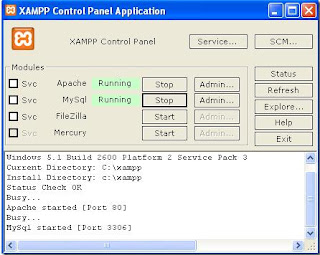
Server hosting is a big problem for those who are learning web design.I will give you a software through which you can make your computer into a server. have to find a software by which you can easily make your computer Sabha. The name of the software is XAMPP. WordPress is a popular web publishing software, which needs PHP version 4.3 and MySQL version 4.0 and server like Apache, IIS, or Litespeed. It is very difficult to manually set up these if you do not have the knowledge about it.XAMPP is a bundle offer which contains the PHP, MySQL and Apache Web Server together. PHP, MySQL and Apache Web Server configure inside the XAMPP. Those have the software quickly install it in your computer and those have not the software the can download this from here . CLICK HERE. When you install the software you can see a red icon in your desktop screen now double click the icon.


Now run Apache and MySQL. Then, open your Internet browser. Enter your address bar http://localhost and press ENTER. Now you can see the XAMPP interface.


Click on the PHPMyAdmin instant. Now you can see the MySQL Admin Panel.


Now click on Databases and on the screen and create a new database


Now give the database name correctly. In this example, wordpress-test. Now click the Create button. You will receive a confirmation message.


Now go back to PHPAdmin panel, click Server-localhost. Then click on the Privileges


Now click Add a new user. Enter the user name, the host must be Local. Give your password or click Generate button.Now confirm your password.If you generate a password then save it in a Notepad. Click Check All button and then click the GO button.


You will receive a confirmation message and now your computer is ready to install WordPress. Now it is very easy to install wordpress. If you do not have wordpress then download it. Now save it in the folder named htdocs root folder, you can find the folder in which drive you install Xampp.You can find the folder inside Xampp.


Now go to desktop. Open the internet browse and type the correct URL in it.In my case http://localhost/wordpress


Now Click Create a configuration file.


Click Let's go button. Now put the user name and password which you save in the notepad.


Click the submit button. If all goes correctly  you get the following message.

Click Run the install button.

Now give yor Blog name and a used e-mail address. Save your user name and password in a notepad.Now login http://localhost/wordpress/wp-admin.

Keep Well. If you have any query put your comment. Thanks for visiting my blog.

Protect Your Password : Easily Protect Your Password and Computer From Theft.

Hi Reader how are we? Today, I will discuss a very important thing with you. Most of us worried about one thing and that is How can we protect our computer and password from theft. Today I will show you the ways through which a hacker can hack your password. So read my article and be careful about your computer security.

1. Some of the hacker use the Hardware Key Logger.It's very simple but works great.Hardware Key Logger is a Gazette, which has passed through all the computer tools that can be taken. Computer and key board as the connector is used in the Gazette at the cafe. It's like a small device. They looks like :

1. USB or
2. Some are looks like cable.kichu kebla
3. Some Wi - Fi devices.

I aware those people who goes regular in the Internet cafe. Because most of the cafe use these devices. This devices are very cheap so they can buy it very easily and misuse it. We can use technology for the welfare of the people but some people misuse the technology and theft the information of others. So we should be careful about the Hardware Key Logger devices.

Alfred Nobel discovered dynamite for the welfare of the people but we use it killing people.Key logger is such king of thing that you can not delete it with anti virus. Anti virus can not able to detect the Key Logger.key things that you can Logger with any anti-virus can not delete. So hackers can easily hack your g-mail, yahoo, facebook, blogger or other password and misuse it. But if you are careful about this you can save your password and computer easily.


So, be careful and keep well.

Whether or Not Yor Are Blacklisted in Google : Find It Easily With IP Address.

Hi, how are you? In this post I will show you a way through which you can find that whether or not your IP address is blacklisted in google or other search engines.At first you should know what is an IP Address.

IP Address : 
IP means Internet Protocol, is a unique number, which is independent of the identity of the Internet User. Through IP address you can find anyone's location and geographical position.Every device connected to the public Internet is assigned a unique number known as an Internet Protocol (IP) address. IP addresses consist of four numbers separated by periods (also called a 'dotted-quad') and look something like 127.0.0.1.


Are You Blacklisted in Google Or Forums??
In internet we browse various type of websites and sometimes we register with various website or forums. But most of us do not know that which forum or website banned or blacklist our IP address.Now I can show you a way from which you can know the condition of your IP address.

First go to the website Checking My IP. In this website you can see the details about your IP address and also see your geographical location in the map.If any search engine or forum banned your IP address you can easily change your IP and use it.

You can also hide your IP Address and browse the internet. You can also see your download speed from here. I provide an image.

Keep well always. If you do not understand comment for any kind of help.

How to See and Create Flash File (SWF) in Ubantu 12.04 and 11.10 Version.

Sitting to blogging after a long day. So how are you?I hope you are well. Now look how  to see and create flash file (SWF) in Ubantu 12.04 and 11.10 Version.It will use a software. Name of SWF Tools. I have seen all the good programs to run Flash files. Within this tool, you can find the following things :

PDF2SWF-Converter is a Flash file and convert them to PDF files. It does not convert only text and  pdf files but also convert the images, tables, etc.

SWF Combine- is a multifunction tool that through which you can create Flash File Wrapper SWFs, Concatenating SWF, stacking SWFs.

SWF Strings-SWF to scan the text data.

Flash SWF Dump- You can save image files, text, sound, etc.

To install it, open terminal, enter.

sudo add-apt-repositroy ppa:guilhem-fr/swftools
sudo apt-get update
sudo apt-get install swftools

Now you complete the installation.

Thanks for visiting my blog. Take Care....

Configure Linux Server Step by Step.

How are you? We hope for better things.Some of us have question that how can i install linux properly in my computer? If you really want to know this read my whole post.

Step 1 :
At first free 14 GB hard disk space in your computer.

Step 2 :
Make a folder named LINUX  in a drive which you want to setup linux. Then make another folder named LINUX SERVER inside the  LINUX folder.

Step 3 :
Now install Virtual Machine Software in your system. Then install the patch of the software and Run the Software.When you run the software you will see a dialogue box named Tip of the day then unselect the Show on start up from Tip of the day and press OK.

Step 4 :
Now Open V. M. Ware Workstation then click new virtual machine.Then Next> Next> Linux> Red Hat Linux 5 (to be selected)> Next> Use host only networking (to be selected)> Next> Disk Size (Disk Size = 14 GB should be.)> Finish.

To see the whole process i give the screenshot below : 


Now you can see the following screen.
  
Double Click on the CD ROM and select the ISO image set it. Now You can setup your Linux Server. If you have any question about linux operating system installation or linux server installation then comment in the comment box. I am trying to solve your problem. 

Thanks and Take Care.

Ubuntu 12.04 LTS Brightness Problem : Solve Easily.

Ubuntu latest release 12.04 version. Bit this version of  Ubuntu has a big problem and that is brightness problem. If you set e brightness but when you restart the pc then it will reset automatic. This is a huge problem of the Ubuntu 12.04  LTS version.

In fact, it has been decided to keep the compatibility of the monitor. It can be easily resolved. Or press alt + ctrl + T to open terminal.

Now follow the command below :

sudo su -c 'echo 5 > /sys/class/backlight/acpi_video0/brightness'

If the command runs on the success of the 5 1, etc. If you try to view the Brightness decreased or increased. If this command works, then we will be done at boot time for execute rc.local file to be edited, enter the following command in a terminal and paste.

gksu gedit /etc/rc.local

A file will open. Now add "exit 0" before the following line:

echo 5 > /sys/class/backlight/acpi_video0/brightness

There are 5 places you need to enter brightness level. Save. Now restart your PC, please. I hope I do not brightness flowers. Good night.

Thanks and Take Care.